Projects
nvm-pl — Node Version Manager
A fast, lightweight, cross-platform Node.js version manager built in pure Perl. Designed as a zero-dependency alternative to shell-heavy version managers, supporting Linux, macOS, Windows, Bash, Zsh, Cmd, and PowerShell.
// Highlights & Capabilities
- ▹ Cross-platform (Linux, macOS, Windows)
- ▹ Instant version switching via symlinks/junctions
- ▹ Smart caching system to prevent re-downloads
- ▹ Fully tested (72+ tests & CI/CD across 3 platforms)
# Install from CPAN
cpanm NVM::Perl

# Install & Switch Node versions
nvm-pl install 25.1.0
nvm-pl use 25.1.0
Tauri List Tool
A high-performance, cross-platform desktop ETL application built with Rust and Next.js. Engineered to scrub Do Not Call (DNC) records, process massive call center lead files, and automate data normalization workflows.

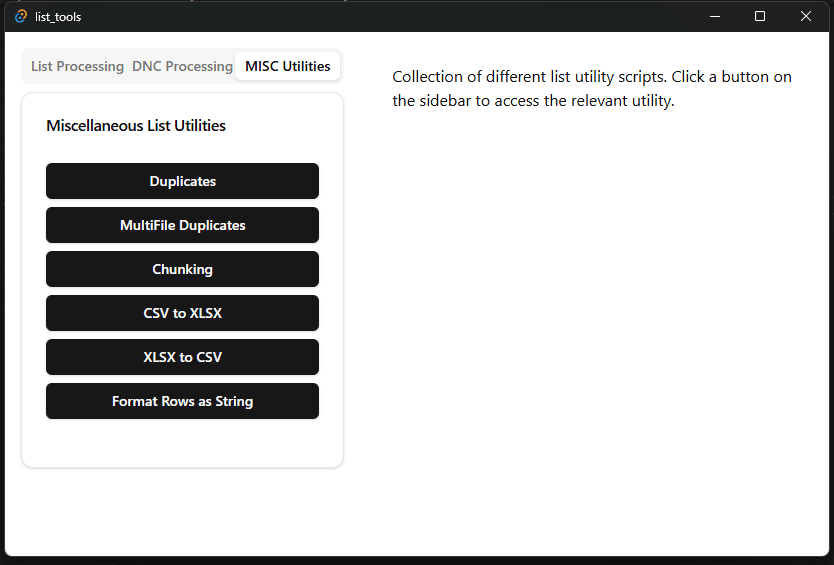
// Key Capabilities
- ▹ Scrubs & normalizes DNC and lead data sets
- ▹ Standalone bundled Windows .EXE and MSI releases
- ▹ Deployed in daily production workflows for operations teams
- ▹ Fast desktop IPC between Rust backend and Next.js frontend
Rust core backend wrapped in Tauri's native webview shell, featuring a responsive React/Next.js interface with TypeScript type safety.
ThreatDetector — Apache Log Parser
A zero-config Perl security module and CLI utility designed to parse Linux server Apache logs, detect real-time intrusion patterns, and isolate malicious payloads across production web and telephony systems.
// Intrusion Pattern Detection
- ▹ SQL Injection (SQLi) & URL-encoded payloads
- ▹ Cross-Site Scripting (XSS) & Command Injection
- ▹ Brute force authentication & suspicious headers
- ▹ Zero external config required — drop-in API call
Parsing log file...
[SQLi] 192.168.1.42 GET /index.php?id=1%20OR%201=1
[XSS]  192.168.1.42 GET /search?q=<script>alert(1)</script>
Threat summary exported to ./threat_results.log
Linux Kernel Contribution
Authored a key refactor for the Rust Binder driver in the Linux Kernel (drivers/android/binder). Replaced manual linked-list management with KVVec and Arc-based tracking, eliminating several unsafe blocks to move the driver toward an idiomatic, memory-safe ownership model.
// Technical Pillars
- ▹ Refactored raw linked lists into idiomatic Rust abstractions
- ▹ Leveraged
Arcreference counting for memory safety - ▹ Streamlined IPC subsystem memory tracking
- ▹ Merged upstream into Greg Kroah-Hartman's
char-misc-nexttree
Open Source Contributions
Active contributor to core developer tooling, linter ecosystems, and data orchestration infrastructure used by engineering teams worldwide.
Ruff (Astral)
Contributed to high-performance Python linter and formatter tooling written in Rust, improving linter accuracy and developer workflows.
Ansible Lint Core
Resolved runtime pathing issues, environmental isolation bugs with uv, cache directory fixes, and linter speed optimizations across Python infra-as-code automation tooling.
Ansible VS Code Extension
Contributed fixes and enhancements to the official Ansible VS Code extension, improving developer experience, syntax validation, and toolchain integration.
Apache Airflow
Upstream contributions to core data orchestration workflows, pipeline stability, and framework maintenance for large-scale distributed task management.